Black Friday falls on 27 November this year, and Cyber Monday on 30 November. For most Shopify stores running Meta ads, those four days carry more spend and more orders than any other week, which also makes it the week your numbers are easiest to misread. Traffic spikes, discounts change your margins, returning customers flood in from email and SMS, and Ads Manager keeps reporting a ROAS that may have little to do with what landed in your bank account.
Short answer: Fix and freeze your tracking before the sale, then judge your Black Friday Facebook ads on more than Meta's ROAS column. Check that browser and server events arrive and are deduplicated, set a break-even ROAS that accounts for your discount, compare Meta's purchases with Shopify orders every day, and split new from returning customers. After Cyber Monday, recheck the numbers once refunds come in.
Below: why BFCM distorts Meta data, a pre-sale tracking checklist, how to read ROAS during the sale, and what to review afterwards.
Why Black Friday Makes Meta Data Harder to Trust
Meta only optimizes on the purchases it receives. During BFCM a few things work against you at the same time.
More Purchases Never Reach Meta
Browser pixels miss around 30-60% of conversions, because of ad blockers, iOS privacy restrictions, declined cookie banners and pixel scripts that fail to load. That gap doesn't shrink on Black Friday. More orders means more missed orders in absolute terms, and Meta's algorithm is bidding with that incomplete picture during your most expensive week of the year.
Returning Customers Make Meta Look Better Than It Is
Many BFCM buyers already know you. They open your email, see an Instagram ad, and buy. Meta counts that purchase if it falls inside the attribution window, even though the customer would likely have bought anyway. If your Advantage+ or broad campaigns reach existing customers, the ROAS you see can be mostly retention revenue. Our post on how to stop wasting Meta ad budget on returning customers goes deeper on this.
Several Channels Claim the Same Order
The same Black Friday order can show up in Meta, Google, TikTok and Klaviyo, each claiming it under its own attribution rules. Add them up and you get more revenue than Shopify recorded. None of the platforms is lying, but none of them is the full story either.
Duplicate Events Inflate the Count
When the pixel and a server-side connection both send the same purchase without a shared event ID, Meta can count it twice. This often happens when a new app gets installed in a rush before the sale, next to Shopify's own Facebook & Instagram app. The result looks like a great day in Ads Manager and doesn't match your orders. We cover how to diagnose this in Meta conversions don't match Shopify.
Your Pre-BFCM Tracking Checklist
Do this one to two weeks before Black Friday, so you have a few normal days of data after any change. Then leave the setup alone until December.
- Place a test order. Buy something cheap with a discount code, then check that Purchase arrives in Events Manager with the right value and currency (after the discount, before shipping, or whatever rule you use, as long as it's consistent).
- Check browser and server events. In Events Manager, open your Purchase event and look at how it was received. You want both browser and server, with deduplication working. One server stream per channel is enough.
- Check your Shopify data sharing level. In the Facebook & Instagram app, Enhanced and Maximum send server events through the Conversions API, according to Shopify's help center. If you also run a separate server-side tool, set the app to Standard so Meta doesn't get two server streams for the same purchase.
- Look at Event Match Quality. A low score on Purchase and AddToCart means Meta struggles to tie events to people. See how to improve Meta's Event Match Quality if yours is low.
- Remove old pixels. Old apps and hard-coded theme snippets keep firing long after you stop using them. One pixel ID per store.
- Write down your baseline. Note last month's Meta-reported purchases next to Shopify orders for the same days. That ratio is what you will compare against during the sale.
- Freeze the setup. No new tracking apps, theme changes or checkout scripts during BFCM week. If numbers move, you want to know it was the campaigns.
Set Your Break-Even ROAS Before the Discount Goes Live
A discount changes the ROAS you need, and most teams forget to update the target. Break-even ROAS is 1 divided by your margin on the sale (after product costs, shipping and payment fees).
Take a product that sells for $100 and costs $40 to make and ship. At full price your margin is 60%, so you break even at a ROAS of about 1.67. Put it on 25% off and it sells for $75 with the same $40 cost. Your margin drops to about 47% and break-even ROAS rises to about 2.14.
| Full price | 25% off | 40% off | |
|---|---|---|---|
| Sale price | $100 | $75 | $60 |
| Cost (product, shipping, fees) | $40 | $40 | $40 |
| Margin | 60% | 47% | 33% |
| Break-even ROAS | 1.67 | 2.14 | 3.00 |
So a 2.5 ROAS that looked healthy in October is barely profitable at 40% off. Agree on the BFCM break-even number with the client or founder before the sale starts, so nobody scales on a ROAS that loses money.
How to Read ROAS During the Sale
Ads Manager updates fast and BFCM decisions are made fast. A short daily routine keeps you from chasing a number that isn't real.
| What you check | Where | What can distort it in BFCM | What to compare it with |
|---|---|---|---|
| Meta purchases | Ads Manager | Missed pixel events, duplicate events | Shopify orders for the same day |
| Meta ROAS | Ads Manager | Returning customers, view-through credit | Break-even ROAS at your discount |
| Blended revenue vs total spend (MER) | Shopify and each ad account | Little, it ignores attribution | Your MER from previous weeks |
| New vs returning buyers | Shopify customer reports | Email and SMS pulling in existing customers | Share of new customers in a normal week |
| Event Match Quality | Events Manager | Many first-time visitors with little matching data | Your score before the sale |
A few habits help.
Compare Meta purchases with Shopify orders every morning. If the ratio moves far from your baseline in one day, something changed in tracking, not in demand. Look for duplicates or missing server events before you touch budgets.
Look at blended numbers next to Meta's. Marketing efficiency ratio (total revenue divided by total ad spend) doesn't care which platform claims the order. If Meta's ROAS climbs while MER stays flat, Meta is probably taking credit for sales other channels or your email list brought in.
Check the attribution setting before you compare. Meta's standard setting is 7-day click and 1-day view. View-through purchases count, which matters in a week when people see your ads and also get your emails. Ads Manager lets you compare attribution settings side by side. If most of a campaign's purchases only appear with view-through included, treat that ROAS with caution.
Don't make big cuts on a single day. Some BFCM shoppers click an ad on Thursday and buy on Monday. Purchases also show up in Ads Manager with a delay. Judge campaigns over two or three days where you can.
Watch new customer share. If most Black Friday buyers from a campaign are existing customers, that campaign is doing retention work. Exclude existing customers from prospecting campaigns, or give Meta a signal for new customers so it can optimize for them.
What to Review After Cyber Monday
The real BFCM result only settles a couple of weeks later.
Start with refunds and cancellations. Meta doesn't subtract a refund from the purchase it already counted, so recalculate ROAS on net revenue once most of your return window has passed.
Then count how many first-time buyers came in and what each one cost. For next year's planning that number tells you more than the four-day ROAS.
Look at the gap between Meta and Shopify too. If Meta reported far fewer purchases than you had orders, your ads probably did better than Ads Manager suggested, and Meta spent the week optimizing on partial data. That is worth fixing before Q1.
Last, update your audience lists. Your new BFCM customers belong in your suppression lists, so January prospecting doesn't spend money on people who just bought.
Where Server-Side Tracking Fits
Everything above works with any setup. Server-side tracking makes the numbers you check more complete.
TrackBee runs next to your browser pixels and sends Shopify events (product views, add to cart, checkout steps and purchases) server-side to Meta, Google, TikTok, Pinterest, GA4 & Klaviyo. It enriches it with first-party data such as hashed email and phone, click IDs and order values, which helps Event Match Quality. Built-in deduplication keeps the pixel and server event from being counted twice.
Two features matter most in BFCM week. TrackBee sends Meta a new vs returning customer signal, so you can see and optimize for first-time buyers. And with Custom Audience Sync it keeps Meta custom audiences up to date from your shopper profiles, which you can use as suppression lists for prospecting or as the base for lookalikes.
Setup takes under five minutes with no developer. If you install it now, you have a week or two of normal data before Black Friday and can freeze your setup in time.
Frequently Asked Questions
Should I change my Meta tracking right before Black Friday? Only if something is broken. Make changes one to two weeks before the sale so you can confirm events and deduplication work with normal traffic. During BFCM week, keep the setup frozen so changes in your numbers come from campaigns.
Why does Meta report a different ROAS than Shopify on Black Friday? Meta counts purchases inside its attribution window, including view-through, and it misses purchases the pixel never sent. Shopify counts every order. Duplicate events can push Meta higher, missed events push it lower, and returning customers make Meta's credit look larger than the new revenue it drove.
What is a good ROAS for Black Friday Facebook ads? There is no single number. Your break-even ROAS is 1 divided by your margin after the discount. A 25% discount on a product with 60% margin raises break-even ROAS from about 1.67 to about 2.14, so set your BFCM target from your own margins.
Should I exclude existing customers from Black Friday campaigns? From prospecting campaigns, usually yes, so Meta spends on new buyers. Keep a separate campaign or your email and SMS flows for existing customers, who often respond well to BFCM offers.
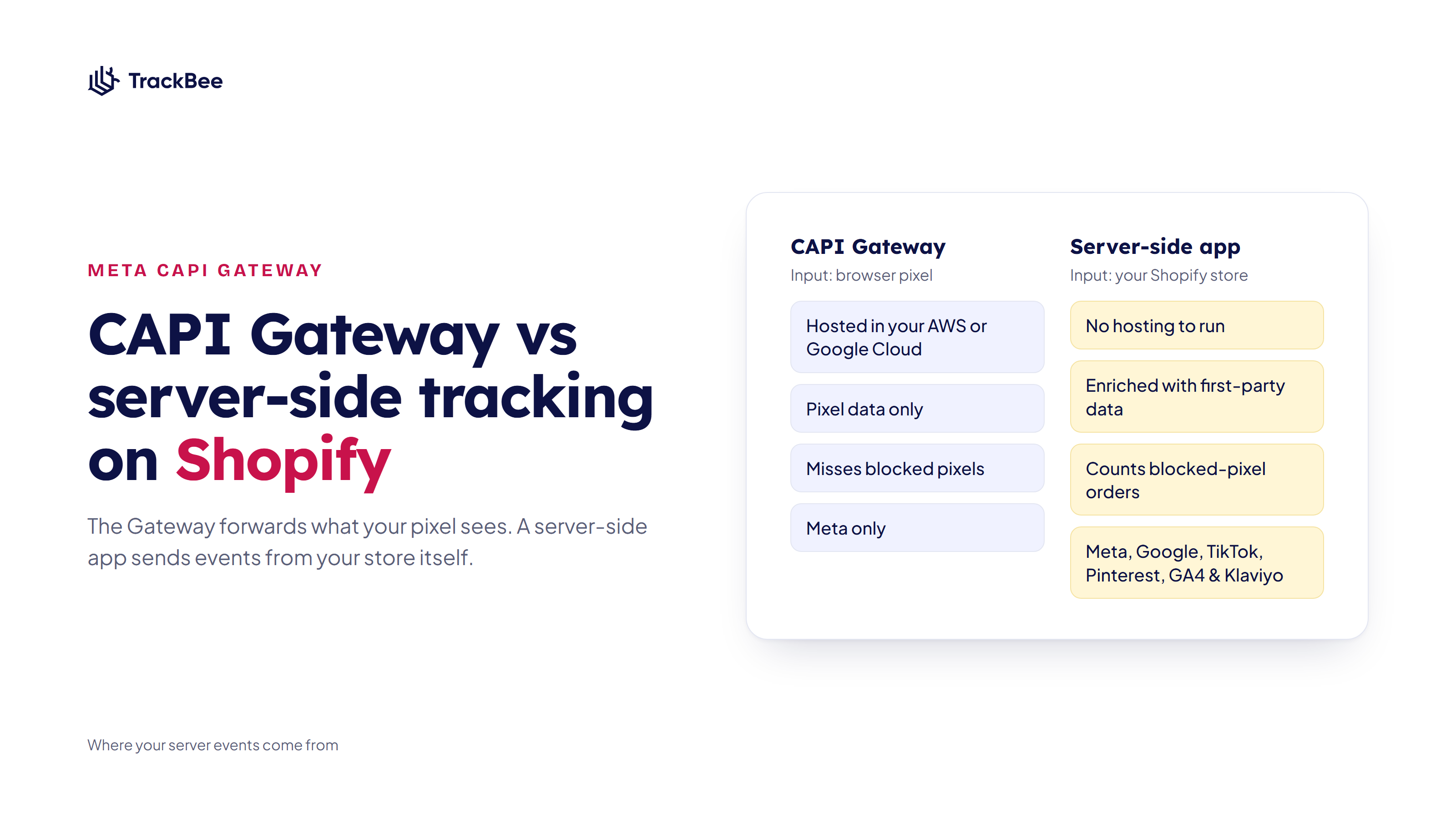
Do I need server-side tracking for Black Friday? It helps Meta receive purchases the browser pixel misses, which matters most in your highest-spend week. Shopify's Facebook & Instagram app already sends some server events on Enhanced and Maximum. A server-side tracking app adds events from your store's backend, enriched with first-party data, for all your channels.
When should I evaluate my BFCM results? Look at daily trends during the sale, but do the final review two to three weeks after Cyber Monday, once refunds and cancellations have come in.
Go Into BFCM With Data You Can Trust
TrackBee sends each Shopify event server-side, enriches it with first-party data and deduplicates it against your pixel, for Meta, Google, TikTok, Pinterest, GA4 & Klaviyo. Install it now and you have clean data in place before Black Friday.
Try TrackBee free for 30 days, or book a free demo.
Read next: Meta conversions don't match Shopify | Marketing efficiency ratio