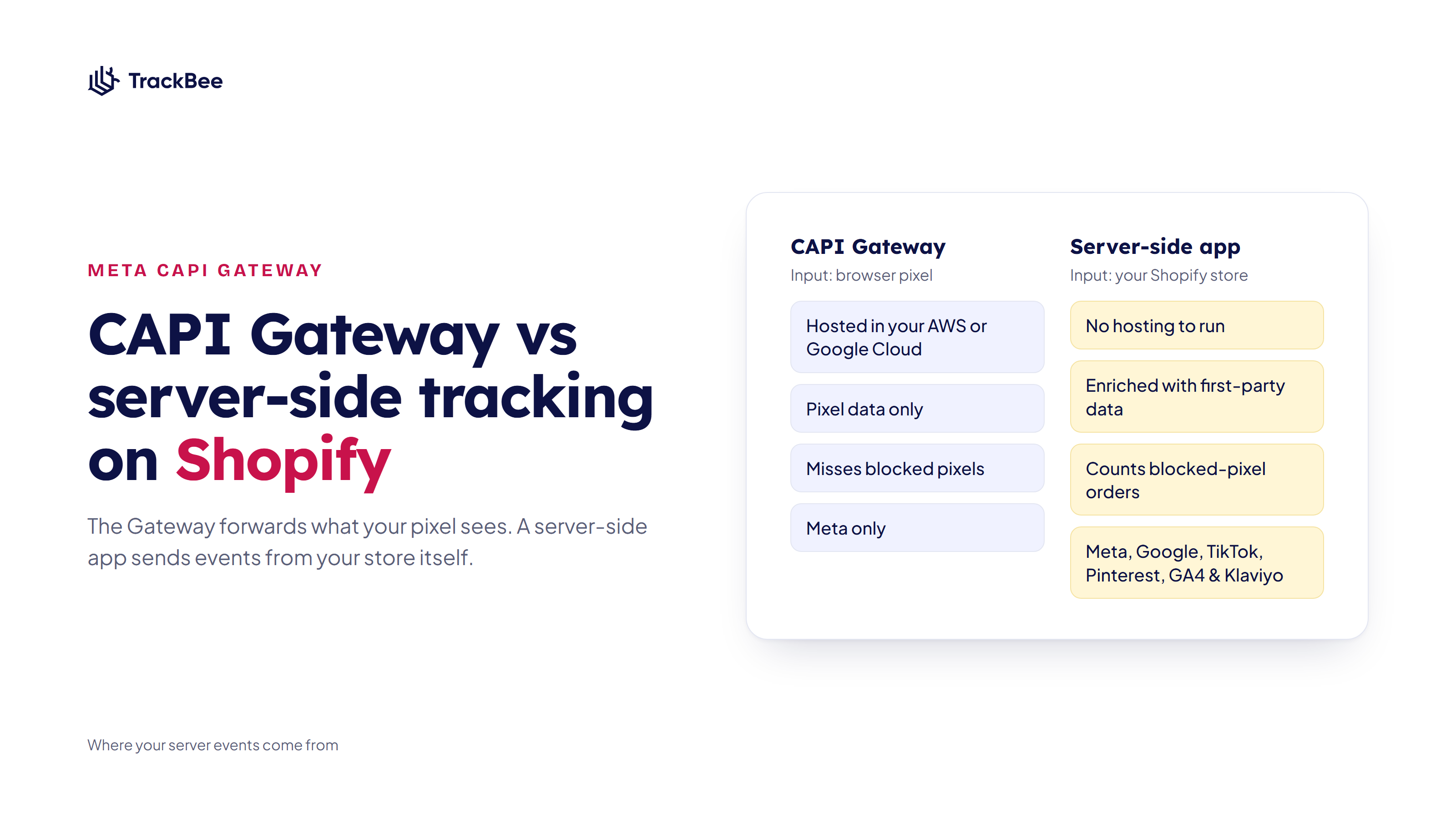


Short answer: The Meta Conversions API Gateway (CAPI Gateway) is a free piece of Meta software that you host in your own AWS or Google Cloud account. It copies the events your Meta Pixel fires and sends them to Meta server-side, with deduplication built in. There is no license fee, but you pay the cloud bill and someone has to own the setup. Because it only forwards what the browser pixel sees, it does not recover purchases from shoppers whose browser blocked the pixel, and it only feeds Meta. A Shopify server-side tracking app sends each event from your store's backend, enriches it with first-party data and covers your other channels too.
This post covers how the Gateway works, what it costs to run, its limits on a Shopify store, and how to choose between the Gateway, Meta's own options and a server-side app.
What Is the Meta Conversions API Gateway?
The Conversions API Gateway is a self-serve option in Meta Events Manager that sets up the Conversions API next to your pixel without custom code. Meta describes it as a way to send events with the Meta Pixel and the Conversions API "in a redundant set up" (Meta for Developers).
The key detail is where it runs. The Gateway is not hosted by Meta. It is provisioned inside a cloud account that your business owns. Meta's documentation lists AWS and Google Cloud as supported providers, and you can also have a partner host it for you.
Meta built it for advertisers who want server-side events without a developer. Its docs say performance marketers "with some technical expertise" can set it up and that no coding is needed. You do need admin access to a cloud provider account and to your Meta Pixel, and ideally access to your DNS to add a subdomain.
How the CAPI Gateway Works
- You create the Gateway from Events Manager. Meta walks you through launching it in your AWS or Google Cloud account. On AWS this runs as a CloudFormation stack, which Meta says takes about 30 to 40 minutes.
- You point it at an endpoint, preferably a subdomain of your own site. Meta recommends a custom domain and notes it may reduce data routing costs.
- Your Meta Pixel is connected to the Gateway. From then on, every time the pixel fires in a shopper's browser, it sends the event to Meta as usual and also to your Gateway.
- The Gateway forwards that event to Meta's Conversions API from the server.
- Meta receives the browser event and the server copy, and merges them. The Gateway generates and passes the event ID automatically, so deduplication needs no extra work.
Note step 3: the Gateway's input is the browser pixel. If the pixel fires, the Gateway gets a copy. If the pixel never loads, the Gateway has nothing to forward.
What Does the Conversions API Gateway Cost?
The software is free. Meta states that "the only cost of the Conversions API Gateway is the associated cloud resource or partner fees." What that comes to depends on your traffic and your setup.
Cloud hosting. You pay AWS or Google Cloud for the servers that run the Gateway and for the data that passes through it. Meta does not publish a fixed price in its Gateway documentation. Independent setup guides put a small, self-hosted store at tens of dollars a month, rising with event volume. Meta's AWS setup includes budget alerts so you can see costs climbing.
Managed hosting. Several partners run the Gateway for you and charge a monthly fee, usually per pixel. You skip the cloud account, but you still pay for hosting.
Your time. Someone has to own the cloud account, its billing and access, apply updates, and notice when events stop arriving. Meta's own troubleshooting advice is to wait up to two hours for events to show up after setup and contact Meta if they don't.
What it doesn't include. The Gateway only feeds Meta. If you also advertise on Google, TikTok or Pinterest, or rely on GA4 and Klaviyo, each of those still needs its own server-side connection.
CAPI Gateway vs the Other Ways to Run Meta CAPI on Shopify
A Shopify store has four realistic ways to get server-side events into Meta. They differ mainly in where events come from and who maintains the setup.
| CAPI Gateway | Conversions API with Meta (one-click) | Shopify Facebook & Instagram app | Server-side tracking app | |
|---|---|---|---|---|
| Where it runs | Your AWS or Google Cloud account | Meta | Shopify and Meta | The app's infrastructure |
| Source of events | Browser pixel | Browser pixel | Pixel plus Shopify's own server events | Your store's backend and browser |
| Hosting cost | Cloud or partner fees | None | None | Subscription |
| Who maintains it | You | Meta | Shopify and Meta | The app |
| Recovers events the pixel missed | No | No | Partly, for the events Shopify sends server-side | Yes |
| Extra customer data per event | Pixel data and advanced matching | Pixel data | Depends on the data sharing level | Enriches it with first-party data |
| Custom events (for example new vs returning customers) | No | No | No | Depends on the app |
| Other channels | Meta only | Meta only | Meta only | Meta, Google, TikTok, Pinterest, GA4 & Klaviyo (TrackBee) |
Two notes on the table.
Meta now offers a hosted version. Since April 2026, Events Manager has a free one-click option where Meta runs the server connection for you. Meta's own Gateway documentation points out that if you only need to send website events to Meta, this option does it "without you having to host or maintain anything." For most Shopify stores that would have considered the Gateway for simplicity, the one-click option does the same job without a cloud bill. Our Meta CAPI guide for Shopify covers what it does and leaves out.
Shopify already sends server events. In the Facebook & Instagram app, the Enhanced and Maximum data sharing levels use the Conversions API next to the pixel, according to Shopify's help center. Only Standard is pixel-only. So many Shopify stores already have a server stream to Meta before they add anything.
Where the CAPI Gateway Falls Short on Shopify
The Gateway is a server-side mirror of your pixel, and it does that job well. On a Shopify store that runs ads on more than one channel, five limits come up.
It Can't Recover Events the Pixel Missed
Ad blockers usually block the Meta Pixel script itself. Shoppers who decline cookies stop most pixel activity. In both cases the pixel never fires, so the Gateway never receives the event. Browser pixels miss around 30-60% of conversions, and a server copy of the pixel can't fill that gap. It makes the events you already catch more reliable. It doesn't add the ones you lose.
The Data Is Only as Rich as the Pixel's
The Gateway forwards what the browser had: cookies, IP address, user agent, and any advanced matching data the pixel collected. For an anonymous visitor on a product page that is not much. Event Match Quality improves when server events carry hashed email, phone and address data from your store's own records, and the Gateway has no access to those.
It Only Sends Standard Pixel Events
Because it mirrors the pixel, the Gateway sends the events the pixel sends. If you want Meta to optimize for first-time buyers, you need custom events such as a separate purchase event for new customers. The Gateway doesn't create those. See how to stop wasting Meta ad budget on returning customers for why that signal matters.
It Adds a Second Server Stream if You're Not Careful
If your Facebook & Instagram app runs on Enhanced or Maximum, Shopify is already sending server events to Meta. Add the Gateway on top and Meta receives browser events plus two server streams, each with their own event IDs. That is how stores end up with more purchases in Ads Manager than orders in Shopify. If you run the Gateway or any other server-side tool, set the app's data sharing to Standard so the app only handles the pixel. More in Meta conversions don't match Shopify.
It's Meta Only, and It's Yours to Run
Every other channel needs its own server-side setup, and the Gateway itself is infrastructure your team now owns. Meta's Gateway documentation doesn't mention Shopify at all, so checkout behavior on your store is something you verify yourself in Events Manager rather than something Meta has documented.
What a Server-Side Tracking App Does Differently
A Shopify server-side tracking app starts from a different input. Instead of copying the browser pixel, it collects events from your store directly, including orders from Shopify's backend.
That changes three things.
- Purchases count even when the pixel was blocked. The order exists in Shopify whether or not the shopper's browser ran the pixel, so it can still be sent to Meta.
- Each event carries more matching data. TrackBee enriches it with first-party data (hashed email, phone, name and address, plus click IDs and product details) and links shoppers across sessions with persistent shopper profiles. That is what raises Event Match Quality, especially on upper-funnel events.
- One setup covers every channel. TrackBee sends the same event stream to Meta, Google, TikTok, Pinterest, GA4 & Klaviyo, with deduplication against each browser pixel, and adds new vs returning customer events for Meta.
There is no cloud account to run. TrackBee installs as a Shopify app embed and setup takes under five minutes. The trade-off is a monthly subscription instead of a cloud bill.
Which Option Fits Your Store?
You run Meta only, have no CAPI yet and want the simplest step up: use Meta's one-click Conversions API in Events Manager. It is free and needs no hosting.
You want server events under your own control and have someone comfortable with AWS or Google Cloud: the CAPI Gateway works, as long as you set Shopify's data sharing to Standard and accept that it mirrors the pixel.
You advertise on more than one channel, want purchases recovered from blocked browsers or need better match quality: use a Shopify server-side tracking app. Pick one, not several, and keep one server stream per channel.
Whichever you choose, check the result. Open your pixel in Events Manager, look at which events arrive from browser and server, and confirm they are deduplicated. The Meta Pixel Helper guide shows how to check the browser side and where the server side lives.
Frequently Asked Questions
What is the Meta Conversions API Gateway? It is free software from Meta that you host in your own cloud account (AWS or Google Cloud) or through a hosting partner. It receives a copy of every Meta Pixel event and forwards it to Meta's Conversions API, with automatic deduplication.
Is the Conversions API Gateway free? The software has no license fee. You pay for the cloud resources it runs on, or a partner's hosting fee, and the time to maintain it. Meta's one-click Conversions API is the option with no hosting cost at all.
Does the CAPI Gateway work with Shopify? It can run next to a Shopify store, but Meta's Gateway documentation doesn't cover Shopify specifically, and Shopify's Facebook & Instagram app already sends server events on its Enhanced and Maximum settings. If you add the Gateway, set the app to Standard to avoid duplicate server events, and verify checkout and purchase events in Events Manager.
Does the CAPI Gateway get around ad blockers? Not for events the pixel never fires. The Gateway forwards pixel events, so if a blocker stops the pixel script from loading, there is nothing to forward. A tool that sends events from your store's backend can still report those purchases.
What is the difference between the CAPI Gateway and Signals Gateway? Meta presents them as related products built on shared components. The CAPI Gateway forwards pixel events to Meta. Signals Gateway is a broader data pipeline that can take in data from several sources and send it to destinations other than Meta.
Should I use the CAPI Gateway and a server-side tracking app together? No. Both send server events for the same purchases, which makes deduplication harder and can inflate conversions. Pick one server-side source for Meta.
Send Shopify Events to Meta Without Running a Server
TrackBee sends each Shopify event server-side, enriches it with first-party data and deduplicates it against your pixel, for Meta, Google, TikTok, Pinterest, GA4 & Klaviyo. No cloud account, no developer.
Try TrackBee for free, or book a free demo.
Read next: Meta CAPI for Shopify: the complete guide | Why you need event deduplication