How to See POAS and New vs Returning Customers in TikTok Ads Manager

TikTok Ads Manager only shows revenue. Learn how to see profit on ad spend (POAS) and new vs returning customers for your TikTok campaigns on Shopify.
October 30, 2026
Frank de Vos
TrackBee sends NewCustomerPurchase, ReturningCustomerPurchase and PurchaseProfit events to TikTok with every Shopify order
Latest
TikTok

How to See POAS and New vs Returning Customers in TikTok Ads Manager

TrackBee sends NewCustomerPurchase, ReturningCustomerPurchase and PurchaseProfit events to TikTok with every Shopify order

Short answer: TikTok Ads Manager reports revenue, so a campaign that sells low-margin products or mostly brings back existing customers can look like your best one. TrackBee now sends two extra signals to TikTok with every Shopify order: whether the buyer is new or returning, and how much profit the order made. You turn them into custom conversions in TikTok Events Manager once, and from then on you can read POAS and the split between new and returning customers next to your normal results.

Most TikTok reporting stops at revenue. You see purchases, purchase value and ROAS, and you scale whatever looks strongest. That works until you notice that the "best" campaign mainly sells your lowest-margin bestseller, or that half of its purchases come from people who already bought from you last month.

Neither shows up in a revenue number, and both change what a campaign is really worth to you.

This guide covers what changed for TikTok in TrackBee, why profit and customer type matter more than revenue, and how to set both up in a few minutes.

Why Revenue Alone Misleads You on TikTok

Revenue tells you how much was sold. It does not tell you what was left after product costs, or whether you paid to acquire someone you already had.

On TikTok that gap tends to be bigger than on other channels. Hero products and impulse buys do well there, and those are often the items with the thinnest margins. Retargeting and broad campaigns also pick up a lot of returning customers who would probably have bought anyway.

So two things are hidden in your ROAS:

  • Margin. A €120 order with €48 in product costs is worth €72 to you, not €120.
  • Customer type. A first order from a new customer and a fifth order from a loyal one count the same in TikTok's Purchase column.

What ROAS Misses: POAS Explained

ROAS is revenue divided by ad spend. POAS, profit on ad spend, is profit divided by ad spend. The difference matters as soon as your products have different margins.

Two TikTok campaigns compared on ROAS and POAS: the higher ROAS campaign returns less profit

Take two campaigns that each spent €1,000 (example numbers):

  • Campaign A sells a low-margin bestseller. €4,000 in revenue, €900 in profit. ROAS 4.0, POAS 0.9.
  • Campaign B sells a higher-margin range. €2,800 in revenue, €1,600 in profit. ROAS 2.8, POAS 1.6.

On ROAS, you would push more budget into Campaign A. On POAS, Campaign A loses 10 cents on every euro and Campaign B is the one making money. A POAS above 1 means the campaign earned back more profit than it cost.

Why New vs Returning Customers Matter on TikTok

A first order from a new customer and a repeat order from someone who already knows you mean very different things, but TikTok counts them the same. Whether you use TikTok to find new customers, to bring people back, or both, you want to know which of the two each campaign is actually delivering.

Splitting new vs returning customers lets you:

  • See your cost per new customer per campaign, instead of a blended cost per purchase.
  • Keep repeat orders out of your acquisition numbers.
  • See how much revenue comes from returning customers, so retargeting and retention campaigns get credit for what they bring back.
  • Judge retention campaigns on returning customers, and acquisition campaigns on new ones.

What TrackBee Now Sends to TikTok

TrackBee already sends every Shopify purchase to TikTok server-side through the TikTok Events API and enriches it with first-party data, so TikTok can match it to the right shopper. On top of the normal Purchase event, you can now turn on three extra events:

  • NewCustomerPurchase: a purchase from someone who buys from your store for the first time.
  • ReturningCustomerPurchase: a purchase from someone who has bought from your store before.
  • PurchaseProfit: the same order, but with the profit as its value instead of the revenue.

The new and returning events carry the order value, so you see revenue per customer type. TrackBee calculates profit as the order total minus your product costs. Those costs come from the "Cost per item" field in Shopify, plus any cost fallbacks you set in TrackBee.

Your regular Purchase event keeps working exactly as before. The new events come on top of it.

How to Set It Up

Both features live in your TikTok setup in TrackBee. TikTok does not let TrackBee create custom conversions for you, so there is one short step in TikTok Events Manager as well.
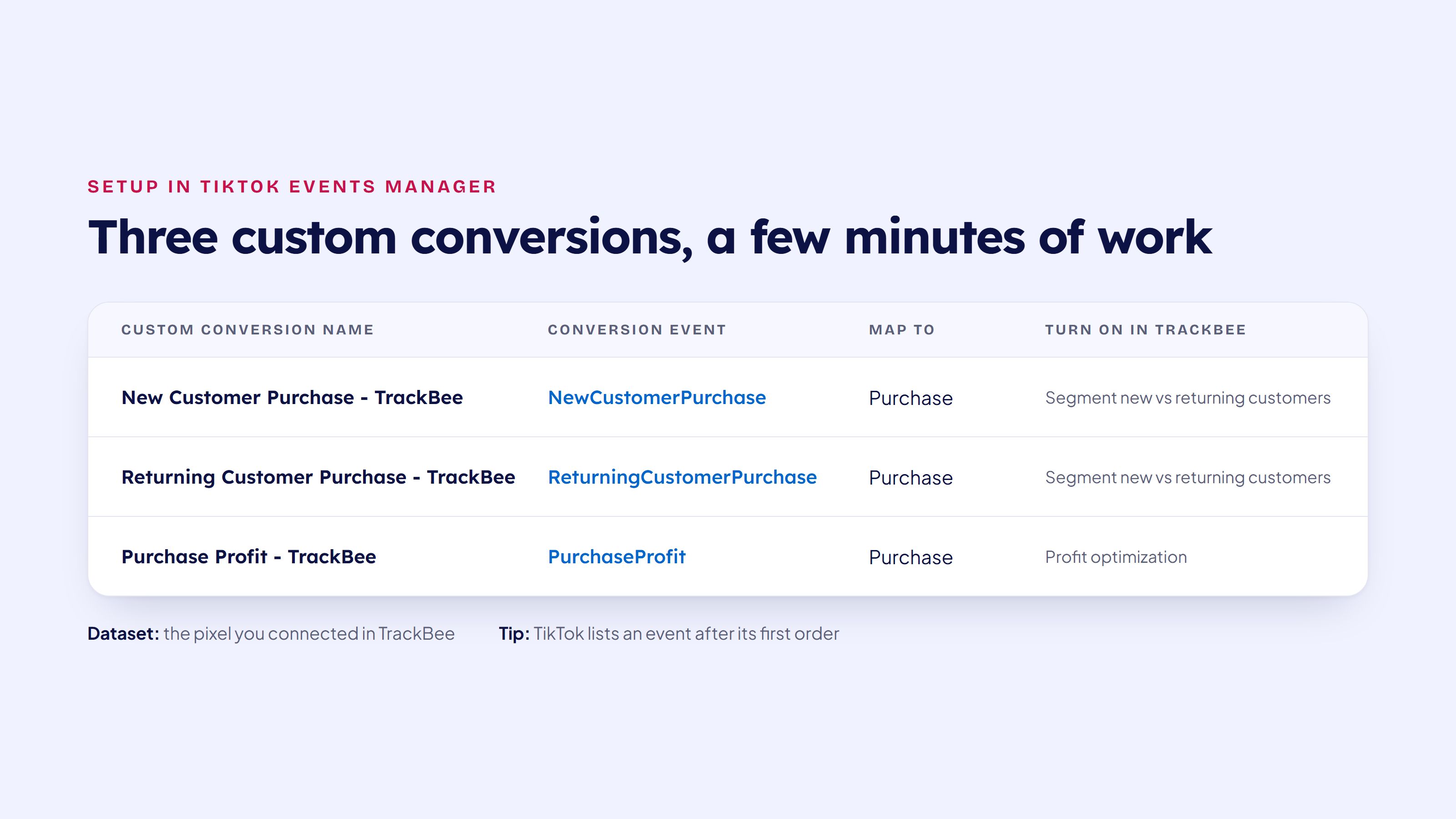
The three custom conversions to create in TikTok Events Manager

Step 1: Turn the Features On in TrackBee

  1. Open your TikTok setup in TrackBee.
  2. At the last steps, enable Segment new vs returning customers and Profit optimization.
  3. Click Finish. All steps should show a check mark.

Step 2: Wait for the First Orders

TikTok only lists an event in Events Manager after it has received it at least once. So wait for your first order from a new customer, one from a returning customer, and one order after you turned on profit optimization. Even then it can take a few hours before the events show up.

Step 3: Create the Custom Conversions in TikTok

Open TikTok Events Manager, go to Custom conversions and create one per event:

  • New Customer Purchase - TrackBee: conversion event NewCustomerPurchase, mapped to Purchase
  • Returning Customer Purchase - TrackBee: conversion event ReturningCustomerPurchase, mapped to Purchase
  • Purchase Profit - TrackBee: conversion event PurchaseProfit, mapped to Purchase

For the dataset, pick the pixel you connected in TrackBee. Right after you create a conversion it can say "Waiting for activity". That is normal and updates with the next orders.

Step-by-step guides with screenshots: new vs returning customers in TikTok and POAS in TikTok.

How to Read the Numbers in TikTok Ads Manager

Add the new custom conversions as columns in TikTok Ads Manager. Then:

  • POAS = the value of Purchase Profit - TrackBee divided by spend.
  • Cost per new customer = spend divided by the number of New Customer Purchase - TrackBee conversions.
  • Returning customer revenue = the value of Returning Customer Purchase - TrackBee.
  • New vs returning split = new customer purchases compared with returning customer purchases, per campaign.

Read these next to ROAS. A campaign with a strong ROAS and a weak POAS sells a lot but earns little. A campaign with a high cost per purchase but a low cost per new customer may be doing exactly the job you want from TikTok. And a retargeting campaign that mostly brings back returning customers is doing its job too, as long as you judge it on that.

Good to Know

  • Only orders placed after you turn the features on are split or sent with profit. Older orders are not sent again.
  • For accurate profit, fill in the cost per item for your products in Shopify. Without it, TrackBee uses the cost fallback you set.
  • If you have more than one TikTok pixel, check the pixel ID on the TikTok step in TrackBee and use the same one in Events Manager.

The same two features are available for other platforms too. See optimizing your ads for profit and optimizing for new customers, or the full TikTok integration page. New to TrackBee and TikTok? Start with our TikTok Events API for Shopify setup guide.

Frequently Asked Questions

Can I see POAS in TikTok Ads Manager?

Not out of the box, because TikTok only knows the revenue of an order. With profit optimization on, TrackBee sends a PurchaseProfit event with the profit of each order as its value. Turn it into a custom conversion in TikTok Events Manager and you can compare profit with spend per campaign.

How does TrackBee calculate profit for TikTok?

Order total minus your product costs. The costs come from the "Cost per item" field in Shopify, plus the cost fallbacks you set in TrackBee.

How do I see new vs returning customers in TikTok?

Turn on "Segment new vs returning customers" in your TikTok setup in TrackBee. Every order then sends a NewCustomerPurchase or ReturningCustomerPurchase event next to the regular Purchase. Create a custom conversion for each in TikTok Events Manager and add them as columns in Ads Manager.

Does this replace my normal Purchase event?

No. Your Purchase event keeps working as before. The new events come on top of it, so your existing campaigns and reporting are not affected.

Why don't I see the new events in TikTok Events Manager yet?

TikTok only lists an event after it has received it once, and that can take a few hours. Wait for the first matching order after you turned the feature on, then check again.

Are past orders included?

No. Only orders placed after you turn the features on are split into new and returning or sent with profit.

Start Reading TikTok on Customers and Profit

Revenue alone is not enough to decide where your TikTok budget goes. Knowing who bought and what you earned is. Try TrackBee free for 30 days, or book a free demo and we will walk you through it.

In this article
Boost Your Revenue
Track Missing Conversion Data
Lorem Ipsum

Boost Your Revenue

Track & Enrich
Missing Conversion Data

Try for free
Share this:

Short answer: TikTok Ads Manager reports revenue, so a campaign that sells low-margin products or mostly brings back existing customers can look like your best one. TrackBee now sends two extra signals to TikTok with every Shopify order: whether the buyer is new or returning, and how much profit the order made. You turn them into custom conversions in TikTok Events Manager once, and from then on you can read POAS and the split between new and returning customers next to your normal results.

Most TikTok reporting stops at revenue. You see purchases, purchase value and ROAS, and you scale whatever looks strongest. That works until you notice that the "best" campaign mainly sells your lowest-margin bestseller, or that half of its purchases come from people who already bought from you last month.

Neither shows up in a revenue number, and both change what a campaign is really worth to you.

This guide covers what changed for TikTok in TrackBee, why profit and customer type matter more than revenue, and how to set both up in a few minutes.

Why Revenue Alone Misleads You on TikTok

Revenue tells you how much was sold. It does not tell you what was left after product costs, or whether you paid to acquire someone you already had.

On TikTok that gap tends to be bigger than on other channels. Hero products and impulse buys do well there, and those are often the items with the thinnest margins. Retargeting and broad campaigns also pick up a lot of returning customers who would probably have bought anyway.

So two things are hidden in your ROAS:

  • Margin. A €120 order with €48 in product costs is worth €72 to you, not €120.
  • Customer type. A first order from a new customer and a fifth order from a loyal one count the same in TikTok's Purchase column.

What ROAS Misses: POAS Explained

ROAS is revenue divided by ad spend. POAS, profit on ad spend, is profit divided by ad spend. The difference matters as soon as your products have different margins.

Two TikTok campaigns compared on ROAS and POAS: the higher ROAS campaign returns less profit

Take two campaigns that each spent €1,000 (example numbers):

  • Campaign A sells a low-margin bestseller. €4,000 in revenue, €900 in profit. ROAS 4.0, POAS 0.9.
  • Campaign B sells a higher-margin range. €2,800 in revenue, €1,600 in profit. ROAS 2.8, POAS 1.6.

On ROAS, you would push more budget into Campaign A. On POAS, Campaign A loses 10 cents on every euro and Campaign B is the one making money. A POAS above 1 means the campaign earned back more profit than it cost.

Why New vs Returning Customers Matter on TikTok

A first order from a new customer and a repeat order from someone who already knows you mean very different things, but TikTok counts them the same. Whether you use TikTok to find new customers, to bring people back, or both, you want to know which of the two each campaign is actually delivering.

Splitting new vs returning customers lets you:

  • See your cost per new customer per campaign, instead of a blended cost per purchase.
  • Keep repeat orders out of your acquisition numbers.
  • See how much revenue comes from returning customers, so retargeting and retention campaigns get credit for what they bring back.
  • Judge retention campaigns on returning customers, and acquisition campaigns on new ones.

What TrackBee Now Sends to TikTok

TrackBee already sends every Shopify purchase to TikTok server-side through the TikTok Events API and enriches it with first-party data, so TikTok can match it to the right shopper. On top of the normal Purchase event, you can now turn on three extra events:

  • NewCustomerPurchase: a purchase from someone who buys from your store for the first time.
  • ReturningCustomerPurchase: a purchase from someone who has bought from your store before.
  • PurchaseProfit: the same order, but with the profit as its value instead of the revenue.

The new and returning events carry the order value, so you see revenue per customer type. TrackBee calculates profit as the order total minus your product costs. Those costs come from the "Cost per item" field in Shopify, plus any cost fallbacks you set in TrackBee.

Your regular Purchase event keeps working exactly as before. The new events come on top of it.

How to Set It Up

Both features live in your TikTok setup in TrackBee. TikTok does not let TrackBee create custom conversions for you, so there is one short step in TikTok Events Manager as well.

The three custom conversions to create in TikTok Events Manager

Step 1: Turn the Features On in TrackBee

  1. Open your TikTok setup in TrackBee.
  2. At the last steps, enable Segment new vs returning customers and Profit optimization.
  3. Click Finish. All steps should show a check mark.

Step 2: Wait for the First Orders

TikTok only lists an event in Events Manager after it has received it at least once. So wait for your first order from a new customer, one from a returning customer, and one order after you turned on profit optimization. Even then it can take a few hours before the events show up.

Step 3: Create the Custom Conversions in TikTok

Open TikTok Events Manager, go to Custom conversions and create one per event:

  • New Customer Purchase - TrackBee: conversion event NewCustomerPurchase, mapped to Purchase
  • Returning Customer Purchase - TrackBee: conversion event ReturningCustomerPurchase, mapped to Purchase
  • Purchase Profit - TrackBee: conversion event PurchaseProfit, mapped to Purchase

For the dataset, pick the pixel you connected in TrackBee. Right after you create a conversion it can say "Waiting for activity". That is normal and updates with the next orders.

Step-by-step guides with screenshots: new vs returning customers in TikTok and POAS in TikTok.

How to Read the Numbers in TikTok Ads Manager

Add the new custom conversions as columns in TikTok Ads Manager. Then:

  • POAS = the value of Purchase Profit - TrackBee divided by spend.
  • Cost per new customer = spend divided by the number of New Customer Purchase - TrackBee conversions.
  • Returning customer revenue = the value of Returning Customer Purchase - TrackBee.
  • New vs returning split = new customer purchases compared with returning customer purchases, per campaign.

Read these next to ROAS. A campaign with a strong ROAS and a weak POAS sells a lot but earns little. A campaign with a high cost per purchase but a low cost per new customer may be doing exactly the job you want from TikTok. And a retargeting campaign that mostly brings back returning customers is doing its job too, as long as you judge it on that.

Good to Know

  • Only orders placed after you turn the features on are split or sent with profit. Older orders are not sent again.
  • For accurate profit, fill in the cost per item for your products in Shopify. Without it, TrackBee uses the cost fallback you set.
  • If you have more than one TikTok pixel, check the pixel ID on the TikTok step in TrackBee and use the same one in Events Manager.

The same two features are available for other platforms too. See optimizing your ads for profit and optimizing for new customers, or the full TikTok integration page. New to TrackBee and TikTok? Start with our TikTok Events API for Shopify setup guide.

Frequently Asked Questions

Can I see POAS in TikTok Ads Manager?

Not out of the box, because TikTok only knows the revenue of an order. With profit optimization on, TrackBee sends a PurchaseProfit event with the profit of each order as its value. Turn it into a custom conversion in TikTok Events Manager and you can compare profit with spend per campaign.

How does TrackBee calculate profit for TikTok?

Order total minus your product costs. The costs come from the "Cost per item" field in Shopify, plus the cost fallbacks you set in TrackBee.

How do I see new vs returning customers in TikTok?

Turn on "Segment new vs returning customers" in your TikTok setup in TrackBee. Every order then sends a NewCustomerPurchase or ReturningCustomerPurchase event next to the regular Purchase. Create a custom conversion for each in TikTok Events Manager and add them as columns in Ads Manager.

Does this replace my normal Purchase event?

No. Your Purchase event keeps working as before. The new events come on top of it, so your existing campaigns and reporting are not affected.

Why don't I see the new events in TikTok Events Manager yet?

TikTok only lists an event after it has received it once, and that can take a few hours. Wait for the first matching order after you turned the feature on, then check again.

Are past orders included?

No. Only orders placed after you turn the features on are split into new and returning or sent with profit.

Start Reading TikTok on Customers and Profit

Revenue alone is not enough to decide where your TikTok budget goes. Knowing who bought and what you earned is. Try TrackBee free for 30 days, or book a free demo and we will walk you through it.

Latest

Discover other Blogs

Explore our collection of informative and engaging blog posts.

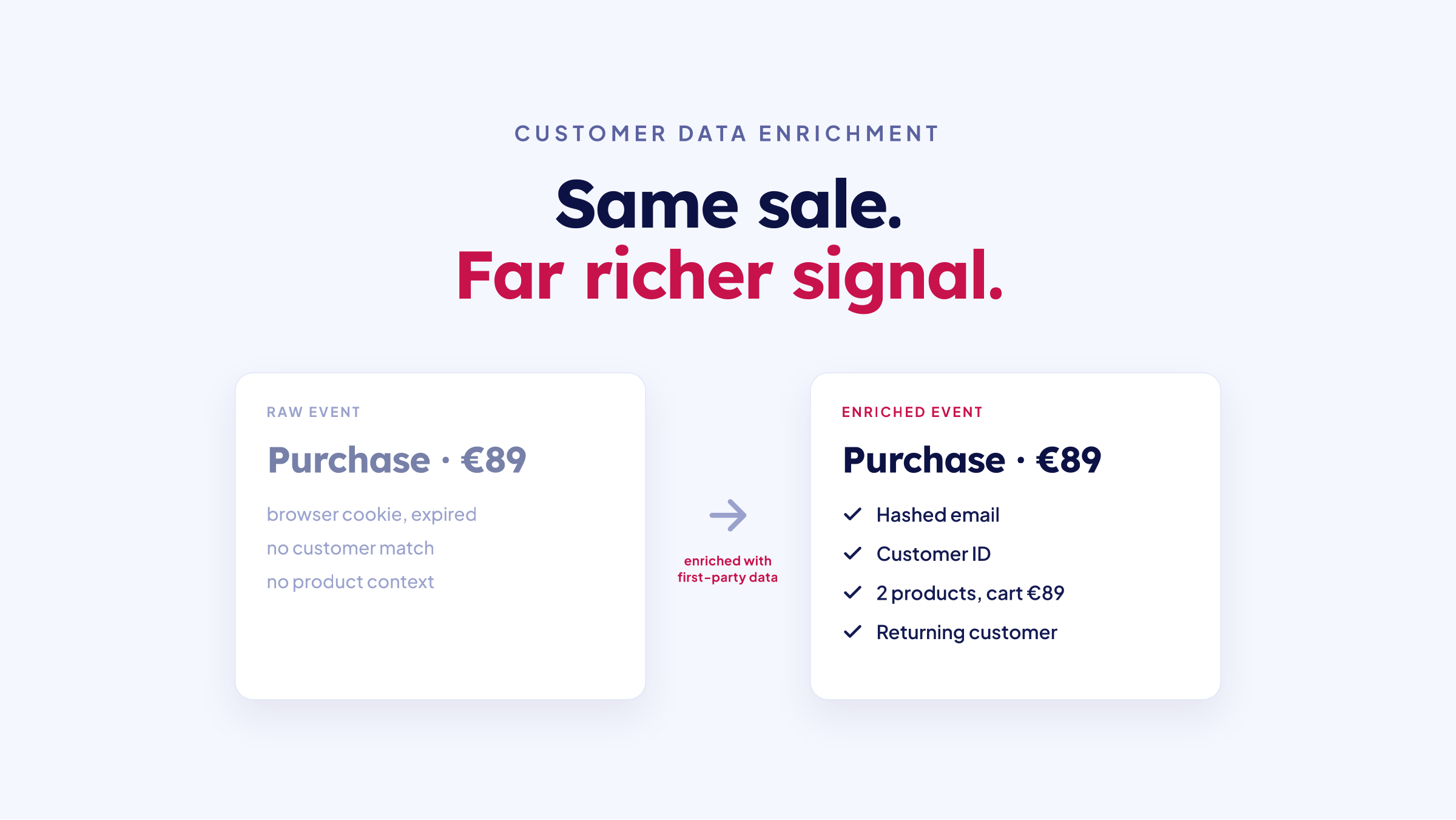
Customer data enrichment: a raw purchase event versus an enriched event with first-party data
Frank de Vos
Frank de Vos
7
min read
Google Ads conversion tracking: every Shopify sale captured server-side feeds Smart Bidding
Frank de Vos
Frank de Vos
6
min read
Cookieless tracking for Shopify: server-side tracking keeps your data when third-party cookies are blocked
Frank de Vos
Frank de Vos
8
min read